
Integrating multiple Bluetooth devices into a network
by Ajna Hodžić, Firmware QA Engineer and Melisa Mesan, Firmware Engineer
Nowadays, almost everyone has heard about Bluetooth technology since it is incorporated in many devices which we use daily. Whether it is your mobile phone, car, or headset, they all have one thing in common – communication over Bluetooth.
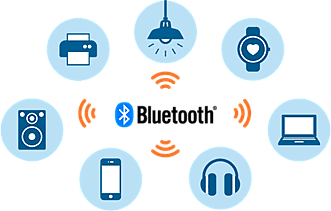
Besides Wi-Fi, Bluetooth is one of the most used wireless communication standards. What makes Bluetooth so popular are its key features – robustness, low power consumption, low cost, and low complexity.
But what is Bluetooth and what is it used for?
Bluetooth is a standardized protocol for sending and receiving data via a 2.4GHz wireless link. It is perfect for secure, short-range, wireless transmissions between electronic devices.
From an engineering perspective, the Bluetooth architecture has its independent model with a stack of protocols, instead of following the standard OSI model or TCP/IP model. All the protocols in the stack are not mandatory for all devices in the Bluetooth system so Bluetooth can be tailored by application needs.
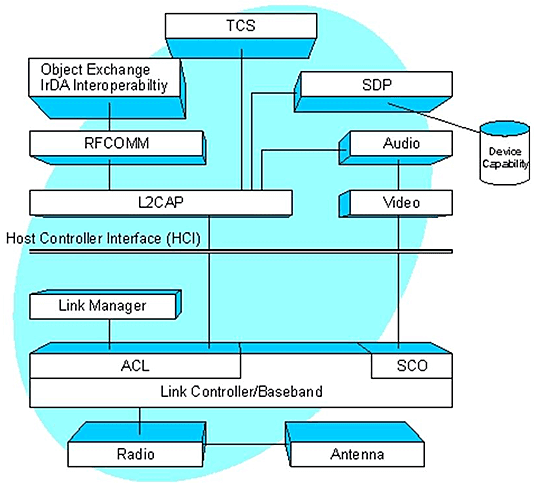
The Bluetooth system divides communication functions into protocol layers where each protocol layer obtains services from the protocol layer below it and performs services for the protocol layer above it.
The diagram above shows the different layers and functional parts of the Bluetooth protocol reference model. Lower-level protocols (such as protocols that are used to manage a radio link between specific points) are only used to create, manage, and disconnect transmission between specific points. Mid-level protocols (such as transmission control protocols) are used to create, manage, and disconnect a logical connection between endpoints that may have multiple link connections between them. High-level protocols (application layer protocols) are used to launch, control, and close end-user applications.
How does Bluetooth work?
Bluetooth networks use a master/slave model to control when and where devices can send data. It connects mobile devices wirelessly over a short-range to form a personal area network (PAN). They use short-wavelength, ultra-high frequency (UHF) radio waves within the range of 2.400 to 2.485 GHz, instead of RS-232 data cables of wired PANs.
Piconets are the most used type of Bluetooth network and they are formed by at most 8 stations, one of which is the master node, and the rest are slave nodes. The master node is the primary station that manages the small network. The slave stations are secondary stations that are synchronized with the primary station.
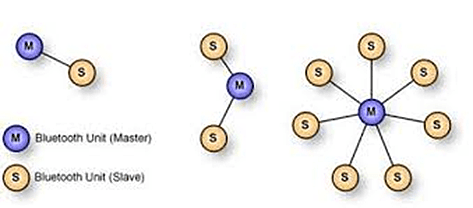
Communication can take place between a master node and a slave node in either one-to-one or one-to-many manner. However, no direct communication takes place between slaves. Each station, whether master or slave, is associated with a 48-bit fixed device address.
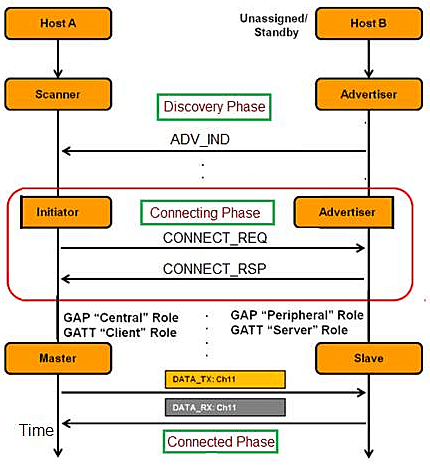
The following diagram is an example of the Unicast (Peer-Peer) connection.
Two devices are going through different phases to establish a connection.
1. Unassigned/Standby phase – In this phase, both devices are on standby until they want to be discovered.
2. Discovery phase – In this phase, the device can be either the Advertiser or Scanner. An Advertiser is a device that wants to be discovered and a Scanner is a device that wants to connect. During this phase, the Advertiser sends advertising packets containing basic information about the host. All Scanner devices receive these packets.
3. Connecting phase – At some point, the Scanner (after filtering/analyzing information in advertising packets) becomes the Initiator and decides to initiate a connection with a specific Advertiser.
4. Connected phase – In this phase, when the Advertiser accepts the connection request, it becomes the Slave while the Initiator becomes the Master. Now the data can be exchanged between them.
How did we integrate multiple Bluetooth devices into a network?
Bluetooth profiles are additional protocols build upon the basic Bluetooth standard to more clearly define what kind of data a Bluetooth module is transmitting. While Bluetooth specifications define how the technology works, profiles define how it's used.
For two Bluetooth devices to be compatible, they must support the same profiles. To have multiple devices in the network, you must ensure that all devices support the same profiles by choosing the right Bluetooth module. One Bluetooth module can support different Bluetooth profiles such as SPP (Serial Port Profile), HID (Human Interface Device), HSP (Headset Profile).
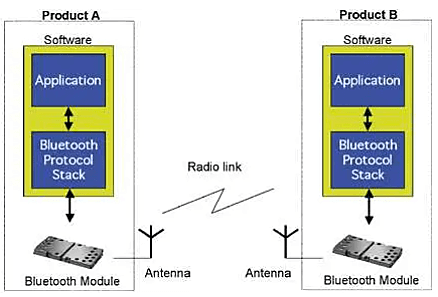
For example, if you want to make a hands-free audio device that can do common phone interactions (accepting/rejecting calls or hanging up), the Bluetooth module must support HFP (Hands-Free Profile).
After choosing the right piece of hardware, the next is Bluetooth stack. Bluetooth stack is software that is the implementation of the Bluetooth protocol stack. Based on the system requirements, demands, and cost, different Bluetooth stacks can be used (BlueZ, FreeBSD, BlueLet, etc).
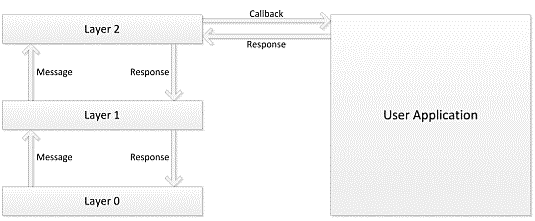
The final step is to implement a user application that oversees device roles, connection process, and data exchange. The user-implemented functions are split into two categories:
1. Event functions – allow the user application to respond to events synchronously as they occur within the stack.
2. Callback functions – invoked when the stack reaches a condition where a decision must be made by the user application (eq. new connection request) before stack operations can continue.
If everything is implemented as expected, devices are ready to communicate over Bluetooth. Choosing the right Bluetooth module and stack in the combination with a well-written user application will allow having multiple devices connected to the Bluetooth network.
When and why choose Bluetooth over Wi-Fi?
Although both are wireless forms of communication, Bluetooth and Wi-Fi differ in terms of their purpose and capabilities. Bluetooth is the first choice if short-range wireless communication is required. Bluetooth is mostly used for low-bandwidth applications at low cost and low power consumption. It doesn't require additional equipment (modems, routers) like Wi-Fi. However, Wi-Fi is better suited for operating full-scale networks because it enables faster connection, better range, and better wireless security.
In the end, the right choice is based on the requirements. If you need a device connected to the Internet, then Wi-Fi is the preferred choice, but if you just need to connect devices without the need for an Internet connection, then Bluetooth is the right choice. Or maybe you need both? It is all up to you! :)